Friday, September 2, 2011

Create a Car

Create a Car is an app that I bought for $.99. You essentially build a car.  You can save your 'cars' to your own garage as well. Once you are finished building your car, you must save it to your garage...you can then touch a 'key' button to start the engine and watch the moving parts.  The cool factor with this app is the building process...there are TONS of parts to choose from and some of them are pretty wild!  For example, for an engine, you can choose from options like: nuclear power exchanger, solar turbo inducer, power engine, solar gain fin, etc.  This is the language factor that I love!  Great opportunities to discuss and use descriptive words.  It also presents great opportunities to ask higher level thinking questions, such as: "Why do you think they named it the solar turbo inducer?  What do those words mean to you?"  or "Why did you pick the nuclear power exchanger?"  If students are not at that vocabulary level, we simply don't use those terms and describe the parts based on appearance.
This app is an example of an app that could stand alone as the activity for the session or across multiple sessions.  There is a lot that can be done language-wise with this app. I can address:
  • basic and advanced car vocabulary, parts, etc
  • sequencing: what steps will we need to do?
  • higher level wh- questions:
    • What would you like your car to look like when it is finished? (pre-discusion)
    • Why did you pick _____ part?
    • Why didn't you pick ______ part?
    • What would happen if you didn't add wheels?
    • What will happen if you don't add an engine?  
    • etc.
  • writing activities:  write a step-by-step list of how you built your vehicle, write descriptive sentences about your vehicle
  • comparing/contrasting: use venn diagrams to compare/contrast 2 vehicles from the garage, put into sentences
  • social language and pragmatics: work on building a car as a team or with a partner, target concepts such as teamwork, being flexible in thought, and using/understanding non-verbal communication to select car parts, etc.
I am sure there are dozens of other goals as well!!!


Geared

Geared is a FREE app that is wonderful for logic and reasoning skills. There are various levels to work through.  There is always one moving gear and one stationary gear (gear A and B) and you must build a bridge (other gears) to connect them.  Once connected, all of the gears will spin.  To add more challenge, there are slider boxes that you must move in order to drop a gear into place.

How does this app apply to therapy or the classroom?  This app is a great example of higher level thinking skills, analyzing problems, trying multiple strategies until you find a solution, and sometimes...teamwork.  This app can be played individually, with a partner, or even in a group.  At the group level, roles/jobs can be given to each player OR the group can work together on forming a plan of action.  This app is also 'geared' towards trial and error...most players will not likely create the correct bridge on the first attempt at each level.  With students, I emphasize that it is ok to try a strategy...it may or may not work.  I also make sure to model mistakes and asking for help.  I have also used this app for students who need practicing appropriate reactions to 'small problems'..."misplacing a gear is a small problem and small problems are ok."

As mentioned, this app addresses higher level thinking, so this is a great app for students who need a challenge! It also is popular with students in the middle school age range.  I have found this app useful for students who still need to work on goals, yet might need a challenging incentive during therapy to keep them motivated.  With these students, I make the student responsible for tracking what level they are on from week to week, etc.  For older students, I have also tried teams...each small group picks a team name and we track what level the team is on.  If a team gets stuck, other teams are allowed to write tips/notes on my whiteboard or they can ask each other at lunch (which they do).  Again, as with all apps, this app is merely an incentive or a 'follow up' to a more structured speech and/or language session. Typically, I use this app when I am targeting logic and reasoning.

To target expressive language, I have the students verbally explain and justify the steps and strategies they use for each turn.  This is also great for addressing sequencing skills.  We talk a great deal (and I model sentences) about planning out what we need to do first and why, etc. I also model what I did wrong during a mistake and why it did not work.

Directions and Tips for Use:
  • Select a level from the Main menu.  There are 80 total levels.   You do not need to unlock the levels. 
  • The gears you have in your tool box are displayed along the bottom of the screen...they vary in size and number. 
  • The gears that you can use or place are shaded gray when placed; however, when dragging them around the screen, they appear mint green.  There are also red shaded boxes on the screen...these are zones where you can not drop a gear...you must drag the gear above the box and let it drop down.
 For this screen shot, I dragged the gear above the red box and then dropped it.

This screen shot shows the purple shaded 'slider box'.

Thursday, September 1, 2011

Names in a Hat

Names in a Hat is a recent app that I purchased for $.99.  It is designed for the iPhone, so you will need to increase the size if using this app on the iPad. I purchased Names in a Hat with the specific desire to have an app that can be used to randomly generate specific targets.  The app was designed to randomly select names, which it could still be used for in a small group or classroom setting.  Here is how I plan to use it (at least a few ideas):
Articulation: Generate lists of target words (can be specific to student...can even generate the lists with the student during the session as a form of practice).  After the list is generated, the student taps the screen and a target word will appear.
Language: Very similar to my above procedure...I will select whatever target I am addressing for that session or student...create my word list...and begin practice!

Truly, this is another universal app that can be adapted for ANY goal...math facts, story starters, unit spelling words or new vocabulary words, synonyms/antonyms, quick break exercises (do 5 jumping jacks or take 2 deep breaths), etc.  This app would work very well when targeting skills in a small group or 'round robin' style activity where students pass the iPad in a circle/group and take turns practicing a skill. It is also a great app because it is quick...I can foresee being able to squeeze in many repetitions during a session.  If a student finishes their session work early or finishes a class assignment early, this is a great app for quick practice of other skills.

Here are some screen shots of current goals/targets that I have already created.


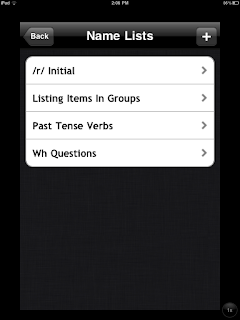
Index of some of the lists I have created

From my "Listing Items in Groups" category


 From my "/r/ initial" for articulation


 From my "Wh- Questions" category

Using Zoom with the iPad Camera

Finding the zoom control for the iPad's camera can be tricky at first.  When in camera mode, you must tap on the screen (anywhere), a slider bar with a +/- along the bottom of the screen will appear.  You can now slide your finger left and right along this bar to control zoom.  Just a tip, this feature can be finicky, sometimes I have to tap a few times before the zoom slidebar appears.   Below is a screen shot of my flowers that I took to show what the slider bar looks like.

Wednesday, August 31, 2011

Now Where Did I Put That App?!?!?!

Do you ever find yourself saying, "Now where did I put that app? I know it's here somewhere!"  If so, just thought I would remind those users who are unaware of this quick tip...you can 'search' for your app!  Swipe all of the way to your first screen, swipe left one more time...this will bring you to the 'Search iPad' screen.  Simply enter the name of your app, keyword (if you have forgotten the name), etc. Or if you don't want to swipe to this screen, touch the small magnifying glass icon at the bottom of your screen...it's to the left of the dots representing what page you are on.  I use this feature often!  


Happy searching!  No more lost apps!

Zap A Minion

Zap A Minion is a FREE app...and yes, it is based on Despicable Me!  This app is similar to Whac-a-Mole games.  You can select levels: easy, medium, or hard.  You select a screen background (nice if visual contrast is something you want to modify).  You can also select a tools to zap minions with: freeze ray, laser, etc.  Goals for this game would include speed/timing, visual scanning, fine motor, etc.  It's also a great app for taking a speedy break during a rigorous session.  It is also on my list of available game apps that can be earned for hard work, completing a lengthy project, remembering homework, appropriate behavior, etc.  Over the summer, I made a chart of app icons for such achievements.  Students will be able to see the chart in my office and work towards earning opportunities to try various apps following completion of specific goals.


My Playhome

I found My Playhome last Spring (2011), and I am finally getting around to writing about this GREAT app!  I love it!!!  My Playhome is similar to a virtual interactive dollhouse, although it is very gender neutral.  There are various family members to choose from. Each room in the house has an extensive number of fun items and actions.  This app is phenomenal for an extensive variety of speech/language goals: following/giving directions, everyday functional vocabulary, pronouns, verbs and verb tense, spatial and temporal concepts, sequencing, descriptive language, etc. Additionally, this app could address fine motor, visual scanning, and social communication.  I would consider this app appropriate for ages 2 years-late elementary, and possibly beyond depending on the skill level and goal of the student. The developer has added features/characters along the way as well.  Students and kids of all ages seem to love this app because you can touch different items for reactions (great cause-effect), such as: radio plays different cd's, tv turns on/off, lights turn on/off, water turns on/off, tap on the fish tank, fry eggs, open cabinets, bounce on the bed, stack blocks, etc. 

Goals:
Vocabulary: There is an extensive array of home items for receptive and expressive vocabulary development.
Sentence Formulation: students could formulate basic or complex sentences ("Tell me a sentence using the word 'because'." "Tell me a sentence using the word 'laundry'." etc)
Following Directions: Students could follow and give directions. ("After the boy makes an egg for breakfast, he will brush his teeth" or "Put the boy to the left of the stove")
Pronouns: "Tell me a sentence using the word 'his'."  "Tell me what the children are doing" (THEY are eating cereal).
Verbs/Verb Tense: "Tell me what the family did yesterday."  "Tell me a sentence about what the boy will have for breakfast tomorrow."
Sequencing: "After I tell you a story, show me what happened" (have the child move the characters following the story) "Every morning, Johnny brushed his teeth first.  Next, he ate cereal for breakfast.  Finally, he listened to music in the living room. Ok, go..." (child completes steps).
Conceptual Terms and/or Following Directions:  Provide directions for students to follow, try reversing roles. 'The frying pan is under the table", etc.
Narratives: Provide or model a sample story/narrative. Discuss what elements are needed. Have the student tell you a story.  I have also told students that after they finish telling their story, I will summarize or retell it...they must listen and see if I remember all of the details.  Also, as we progress with the lesson, I make mistakes when I create a story (I leave out names or specific details, or I 'jump around' and go out of sequence).  The student is required to listen and see what story structures or elements I missed. I have used this skill with older elementary students.
Articulation: Have the student create sentences or stories...listen for their target sound or have them self-monitor for use of their target sound.